Video Downloader for Pinterest
- 4.8
- Rating
- 5.00M
- Installs
- Free
- Price

 Analysis by App-foxy
I tested Video Downloader for Pinterest as a straightforward way to save Pinterest media for later viewing, and my first impression was clear: this is a focused utility rather than a full editing suite or a social network companion. It belongs to the video players and editors category, but its practical role is much narrower. The app is built around downloading Pinterest videos, GIFs, and images so they can be viewed offline, with HD saving available when the source supports it.
That narrow purpose is also its main appeal. I did not approach it expecting a replacement for Pinterest, a professional video editor, or a general download manager. Instead, I looked at how useful it is when a Pinterest post contains something I want to keep on my device, revisit without opening the platform, or use as visual reference. For that job, the app feels easy to understand. The important question is not whether it does everything, but whether a dedicated Pinterest downloader is worth keeping installed when the usual alternatives are screenshots, screen recording, browser tools, or Pinterest’s own save function.
How the app fits into everyday Pinterest use
Video Downloader for Pinterest is developed by Video Download Studio and is available free of charge. It is intended for Everyone, supports devices running Android 6.0 or newer, and its current version is 1.9.1. The app first appeared on July 16, 2022, so it is not a brand-new experiment. Its presence on millions of devices and an average rating of 4.7 from around 146 thousand ratings suggest that the basic idea has connected with a large audience.
You May Also Like

 Blood Strike: 2.5 Anniversary
Blood Strike’s Loadouts Turn Every Drop Into a Tactical Gamble
A close look at Blood Strike’s custom loadouts: how fast access to signature weapons reshapes its battle royale rhythm, rewards preparation, and narrows the gap between fights.

 Pandora - Music & Podcasts
Pandora’s Music Is Easy to Start, but Harder to Recover
Pandora’s strength is its low-effort path from a seed to a station. Its weak spot is how much confidence it asks you to place in connection, setup, and quiet recovery.

 8 Ball Pool
 Is Built on Rivalries, Rematches, and Routine
A close look at the rivalries, rematches, shared routines, and unanswered safety questions that turn a quick pool match into a persistent mobile community.

 Samsung Music
’s Quiet Strength Is Playing What You Already Own
Its reach comes less from spectacle than from dependable access to a personal library. That simplicity is both the app’s strongest retention engine and its ceiling.

 AccuWeather: Weather Radar
AccuWeather Review: A Quick, Clear Forecast for Everyday Decisions
For everyday plans, the best forecast is the one you can understand quickly. AccuWeather makes rain timing, radar, and local conditions easy to act on, with a few trade-offs.

 Hill Climb Racing
Why Hill Climb Racing Still Turns Crashes Into One More Run
A tiny car, a bumpy hill and one more upgrade: Hill Climb Racing keeps resurfacing because its simple chaos makes every near-miss feel personal.
More From Our News Desk



I find the app easiest to understand as a bridge between Pinterest and local storage. Pinterest is excellent for discovering and organizing ideas, but browsing inside the service is not always the same as having a file available on your phone. A downloader changes that relationship: instead of relying entirely on a pin remaining accessible in the same form, you can create a local copy for offline reference. That can be useful for a recipe demonstration, a craft sequence, a workout clip, a design reference, or a short visual idea you want to inspect later.
The free price matters here. There is no purchase decision to make before trying the basic experience, so the value test is mainly about convenience and reliability rather than whether the app justifies a subscription or one-time fee. I would still avoid treating “free” as a guarantee that every download will work perfectly. Pinterest content can vary by source, format, and availability, and a downloader cannot turn an inaccessible or restricted post into a guaranteed local file.
The workflow I would use
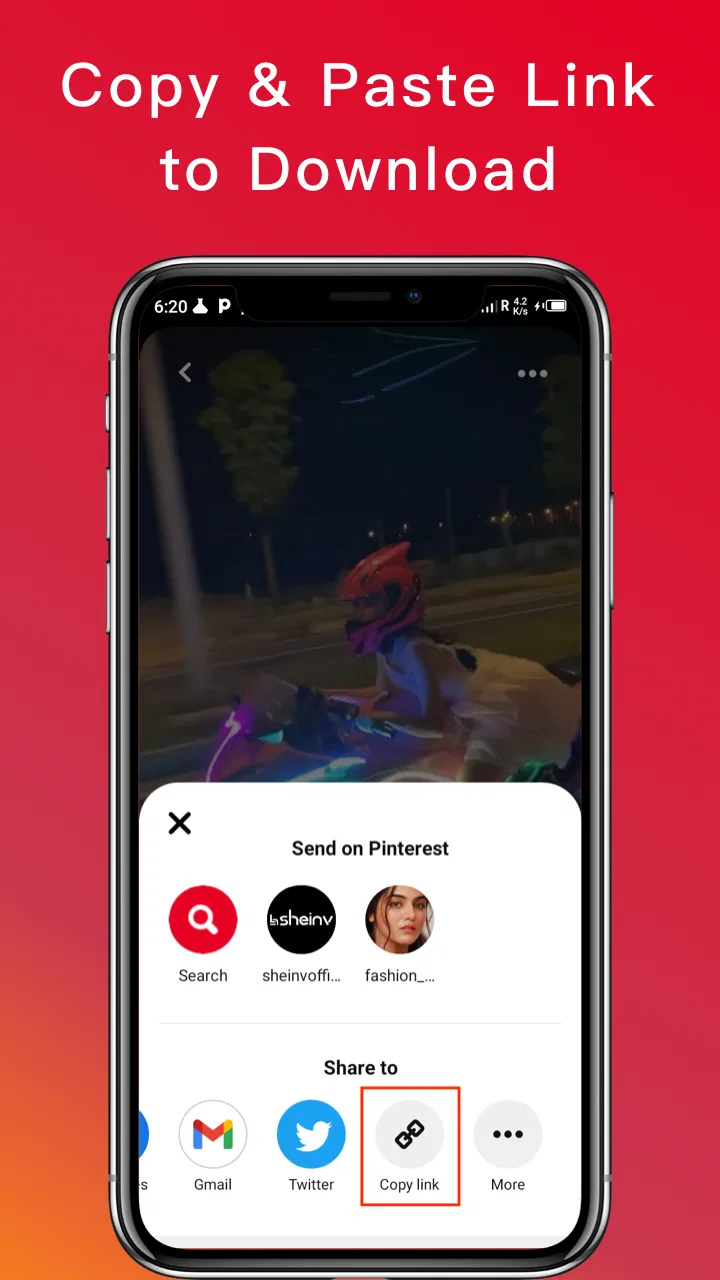
My recommended routine is simple: find the pin in Pinterest, use the platform’s sharing options to pass the relevant pin or media information to the downloader, then check the result in local storage. The important practical step is choosing the correct pin before starting. Pinterest pages often contain several visual elements, and saving the wrong item can be more frustrating than the download itself.
For a quick one-off save, I would not overthink the process. Open the pin, share it to the downloader if that option is available, select the desired media type when the app presents one, and wait for the file to finish. Afterward, I would open the device gallery or file manager and confirm that the result is actually present. This last check sounds obvious, but it helps separate a completed download from a preview, a temporary cache, or a file that was saved somewhere unexpected.
For repeated use, I would create a small habit: download only what I genuinely need, review the saved files occasionally, and rename or organize them soon after saving. A Pinterest downloader can quickly turn a tidy inspiration board into a confusing folder of similarly named clips and images. That is not a flaw unique to this app, but it affects the real value of any saving tool. The app handles acquisition; the user still has to manage the collection.
What makes it more useful than a screenshot
For static images, a screenshot may be enough when I only need a visual reminder. It is quick and does not require another app. The dedicated downloader becomes more useful when the original image should be preserved without interface elements, or when the pin is animated. A screenshot cannot reproduce a GIF’s movement, and it is obviously unsuitable for a video that I want to watch offline.
Video is where the app has a clearer reason to exist. Screen recording can capture motion, but it often adds phone controls, notifications, or quality loss, and it requires real-time playback. A downloader can be more convenient because it aims to save the media directly rather than recording the display. That difference matters when I am collecting several short references or when I want to avoid keeping the screen active during the process.
The HD option is another useful distinction, although I treat it as source-dependent rather than magical. Saving in HD can preserve more detail than a compressed screen recording, but the final result still depends on the quality of the Pinterest media. If the original upload is soft, heavily compressed, or small, selecting a higher-quality option cannot restore detail that was never there.
Three practical details that affect the experience
First, I would use the app for personal reference with a clear understanding of ownership. Downloading a pin to watch privately is different from reposting it, using it in a commercial project, or presenting it as my own work. The app makes saving technically easier, but it does not transfer copyright or permission. Anyone planning to publish the downloaded material should ask the creator or check the relevant rights instead of assuming that a successful download means unrestricted reuse.
Second, I would test the destination folder with one small file before starting a large collection. This is a surprisingly useful workflow because it tells me whether the file appears in the gallery, whether the format opens normally, and whether the app is saving where I expect. It also prevents a common annoyance: downloading several items and only later discovering that the files are difficult to locate or that a particular source does not behave as expected.
Third, I would separate “offline viewing” from “permanent archiving.” A local copy is convenient, but it can be deleted accidentally, become difficult to identify, or stop being useful if the surrounding context of the pin matters. For long-term inspiration, I would keep the downloaded file alongside a note about what it was for, such as “ceramic glaze reference” or “three-step braid example.” That small bit of organization gives the download more value than simply filling storage with unnamed media.
A realistic everyday scenario
Imagine I am planning a weekend craft project. I find a short Pinterest video showing a sequence of steps, but I know the workshop has weak reception. I save the clip before leaving home, then open it from local storage while working. In that situation, the app solves a real problem: I am not depending on a live Pinterest connection, and I do not need to keep scrolling through a board to find the same demonstration.
The same approach works for a visual exercise routine, a cooking technique, or a design reference that I need beside another app. The benefit is not just downloading; it is changing when and where I can consult the material. I can review it during travel, in a room with poor connectivity, or while concentrating on a task rather than browsing socially.
There is also a less obvious use for people who collect visual references for mood boards. Saving a small selection of images and clips locally can make comparison faster than opening each pin individually. I would be selective, though. If I only need a pin’s link, title, or board organization, Pinterest itself remains the better tool because the platform preserves context that a downloaded file may lose.
Where the app is not the best choice
I would skip this app if my main goal is to organize Pinterest discoveries rather than store media. Pinterest boards are designed for that purpose, and keeping everything inside the service avoids duplicate files and reduces clutter. A downloader is most useful when offline access or a local copy matters; it is unnecessary for someone who already feels comfortable returning to saved pins online.
I would also look elsewhere if I need serious editing. The category may include video players and editors, but this app’s identity is centered on downloading Pinterest content. Someone who wants trimming, captions, transitions, audio mixing, color correction, or a structured export workflow should choose a dedicated editor instead. Downloading a clip is only the first step in that kind of project.
Another trade-off concerns platform expectations. The app is designed around Pinterest media, not every website on the internet. If I need one tool for multiple social platforms, a broader download manager may be more suitable, provided it supports those services legitimately. The advantage of a focused app is simplicity; the disadvantage is that its usefulness is tied closely to one source.
How it compares with the usual alternatives
Pinterest’s own save feature is the strongest alternative when organization and discovery are more important than offline files. It keeps pins connected to boards and makes it easier to return to the creator’s page. Video Downloader for Pinterest wins when I want a local copy that can be opened independently of the Pinterest browsing experience.
Browser-based download tools can be convenient because they do not require another installed app, but they may involve more manual steps and are less comfortable for repeated phone use. Screen recording is universal in principle, yet it captures the display rather than obtaining the media directly, so it can be slower and less clean. Screenshots remain perfectly reasonable for a single static reference, especially when speed matters more than file quality or animation.
A general file or media manager may offer broader control, but that flexibility can make the workflow less focused. Video Downloader for Pinterest is attractive precisely because I do not have to configure a large system for a small task. The trade-off is that I should not expect the depth, cross-platform reach, or organization tools of a more comprehensive solution.
Value, limitations, and the people I would recommend it to
Because the app is free, I judge its value by the amount of friction it removes. If I regularly need Pinterest videos, GIFs, or images away from the platform, a focused downloader can earn its place quickly. The useful value comes from direct saving, offline access, and the possibility of retaining better quality than a screenshot or screen recording. Those benefits are practical rather than luxurious.
The limitations are equally practical. Downloads can create duplicates, local files can consume storage, and the quality of the result is tied to the source. A failed or incomplete save can also interrupt the workflow, which is why I recommend checking the first few files rather than assuming every pin behaves identically. The app does not replace good file organization, permission awareness, or a proper editor.
I would recommend it to Pinterest users who collect moving tutorials, animated references, or images they need while offline. It is also a sensible option for someone who wants a quick, dedicated route from a pin to a local file without paying to try it. I would be less enthusiastic for occasional users who only save static inspiration, people who need downloads from many unrelated platforms, and creators looking for editing tools rather than acquisition.
My verdict after using it
Video Downloader for Pinterest succeeds because it stays close to one clear task. The free access makes experimentation easy, and the combination of video, GIF, and image saving gives it more practical range than a screenshot-only workaround. I especially like the offline scenario: saving a short demonstration before a trip or project can be genuinely helpful when Pinterest is inconvenient to browse in the moment.
At the same time, I would not install it expecting a complete media-management system. I would use Pinterest itself for boards and discovery, a dedicated editor for post-processing, and this app for the middle step of obtaining a local copy. That division of labor keeps expectations realistic and makes the tool more useful.
My buy-or-skip decision is simple because there is no purchase barrier: try it if Pinterest downloads are a recurring need, and skip it if your saved pins already cover everything you do. With an average rating of 4.7 and more than five million installs, it has clearly found an audience, while its Everyone age classification makes it broadly approachable. In my view, Video Downloader for Pinterest is worth keeping when offline media matters, but it is best understood as a focused downloader—not a replacement for Pinterest, a universal tool, or a professional editor.
FAQs for Video Downloader for Pinterest
01How do I download videos using the Video Downloader for Pinterest app?
To download videos using the Video Downloader for Pinterest app, simply copy the URL of the Pinterest video you want to download. Open the app and paste the URL into the designated field. The app will process the link and provide you with options to download the video in your preferred resolution.
02Is the Video Downloader for Pinterest app free to use?
Yes, the Video Downloader for Pinterest app is free to use, but it may include in-app advertisements. Some features might be available through a premium version, which can be purchased within the app, offering an ad-free experience and additional download options.
03Is it legal to download videos from Pinterest using this app?
Downloading videos using the Video Downloader for Pinterest app should be done in compliance with Pinterest’s terms of service. Ensure you have permission to download and use the content, especially for commercial purposes. Always respect copyright laws and the rights of the original creators.
04Can I download videos in different formats and resolutions?
Yes, the Video Downloader for Pinterest app allows you to download videos in various formats and resolutions. You can choose the quality that best fits your needs, from standard to high definition, depending on the original video’s availability. This flexibility makes it easy to manage device storage.
05Does the app support downloading from other platforms besides Pinterest?
Primarily designed for Pinterest, some versions of the Video Downloader for Pinterest app might offer limited support for other platforms. However, the core functionality is optimized for Pinterest. Check the app details and updates for any additional supported platforms to ensure it meets your needs.
Pros
- Easy to use interface for quick downloads.
- Supports high-quality video resolutions.
- Fast download speeds without lag.
- No login required to download content.
- Compatible with multiple formats.
Cons
- Contains ads which can be intrusive.
- No built-in video editing options.
- Limited to Pinterest; no cross-platform use.
- Occasional bugs in downloading certain videos.
- Requires internet connection for functionality.

Video Downloader for Pinterest
Gallery